v113で修正済み:12/22アップデート後の画面表示劣化/Fixed in v113: Field map display quality changes drastically when viewed on different display resolutions while using different Graphics settings

携帯端末情報(必須)/Mobile Device Information(Required)*

iPhone SE第三世代

アプリのバージョン(必須)/App Version(Required)*

12/22アップデート適用後、アセットダウンロード後

問題が発生する頻度/Frequency of the issue occurring

毎回/Every time

問題の詳細/Issue Details

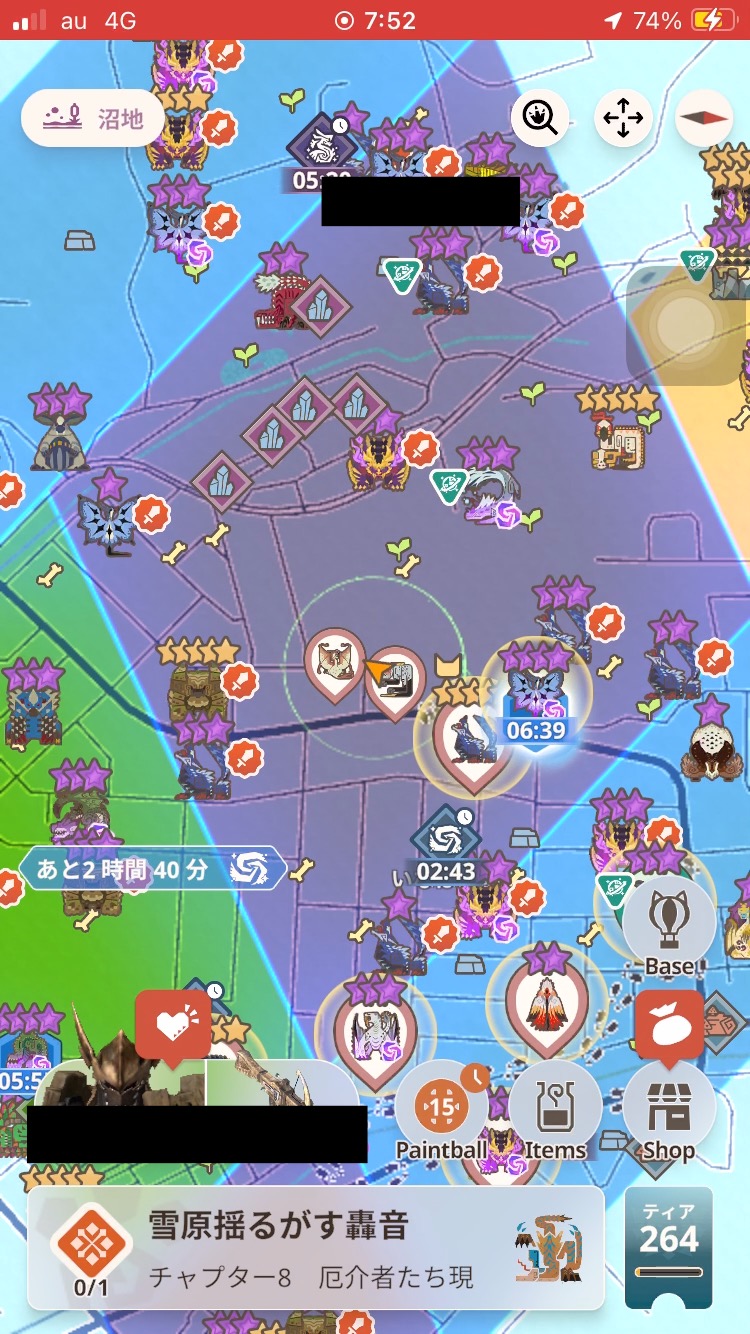
最大望遠での画面にジャギが目立つようになった

その他の情報/Other Information

再起動後変化なし

画像、動画ファイル添付(最大30MB)/Attach screen shots, video files(Max30MB)

15 Likes

@Ryoui1984
アップデート後に画質が変わったとのこと、ご報告くださりありがとうございます。

本現象につきましては詳しくお調べしたいと思いますので以下の情報をご共有下さい。

・「設定」内の「画質」の項目

お手数をおかけしますが、どうぞよろしくお願いいたします。

横から失礼します。

アプデ前からずっと画質設定「中」で遊んでましたが、アプデ後から画質が明らかに劣化しております。

※下に比較画像載せておきます

確認したのですが、勝手に「低」に変更されているとかではありませんでした。

バグというか、サイレントナーフだと思うのですが、画素数低くしたことで動作が軽くなったのかは不明です。

アプデ直後は過去一重かったですし。(アプデ直後は仕方ないのかもしれないけど :sweat_smile: )

※以下、比較画像 (わかりやすいように同じ場所でスクショしてます)

アプデ前↓

アプデ後↓

7 Likes

画質を上げて様子を見てはいかがでしょうか。
以前の「低」と「中」は今の「高」と思われます。

おそらくナイアンの想定よりスペックが低いスマホを持つプレイヤーが多いので下限を追加したのではないでしょうか。

1 Like

そうですね :thinking:

自分はiPhoneですが、古いタイプなのでなかなか「高」設定に踏み込めなかったのですが、試してみるのもアリですね。

でも別にプレイ自体に悪影響は無いし、そのうち目も慣れてくると思うので、実はそんなに気にしてないんです :sweat_smile:

1 Like

携帯端末情報(必須)/Mobile Device Information(Required)*

Samsung S23 Ultra, Android 15, One UI 7.0

アプリのバージョン(必須)/App Version(Required)*

v112.0-251217-2138

問題が発生する頻度/Frequency of the issue occurring

毎回/Every time

問題の詳細/Issue Details

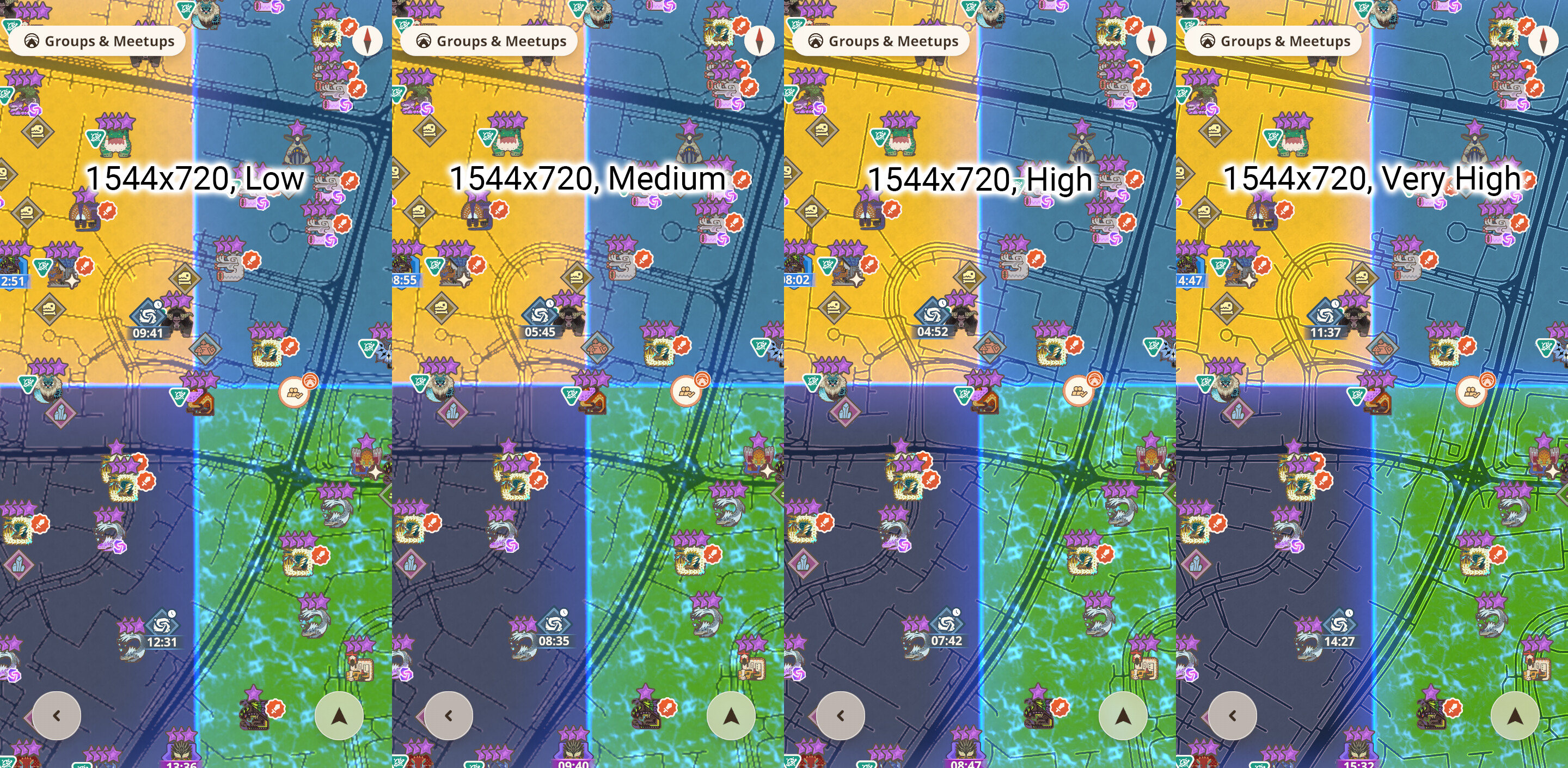
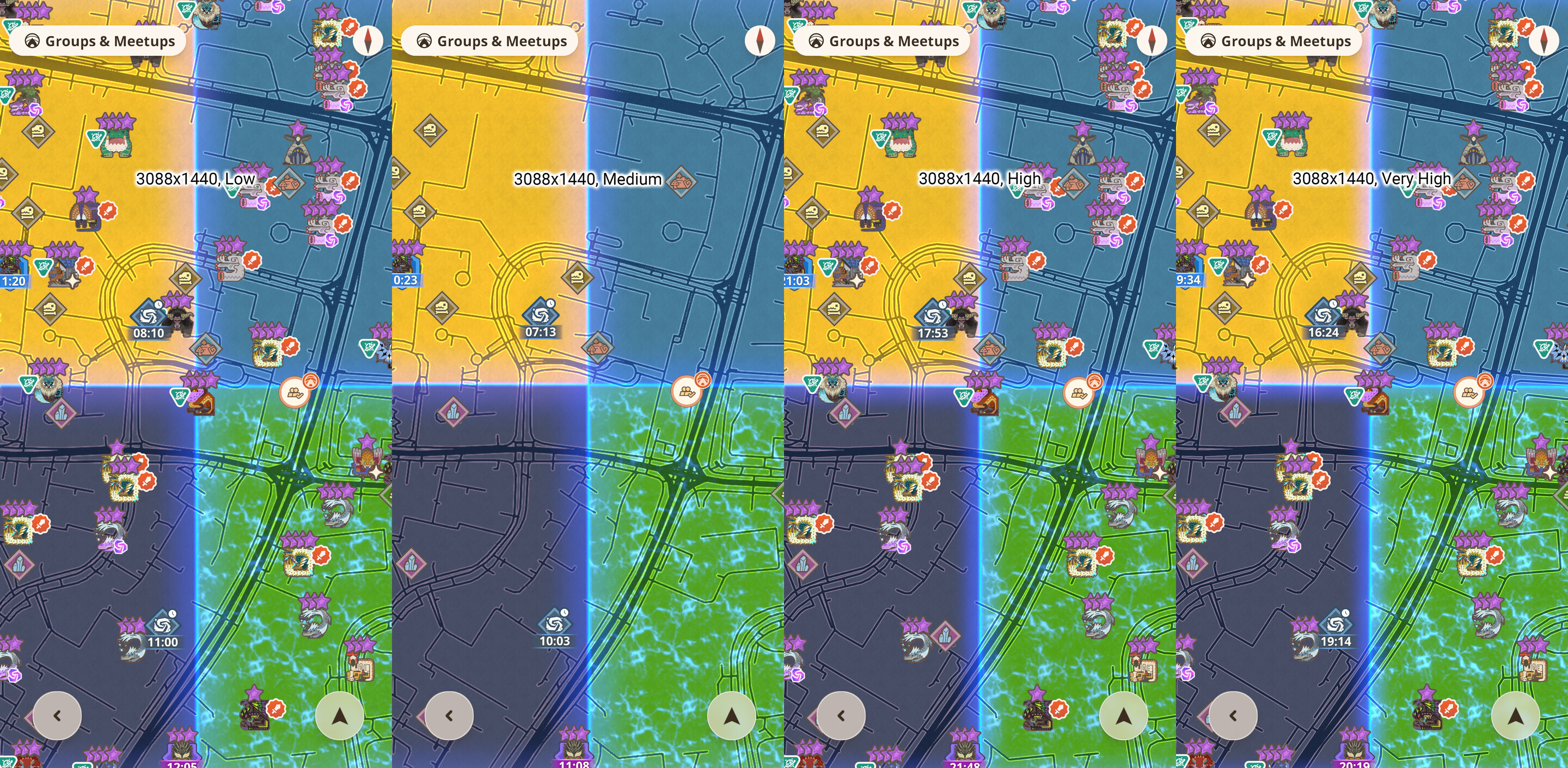
The rendering quality of the field map is drastically poor when playing on a low resolution and coupled with using Low quality graphics settings.

You can observe that when the device has a higher display resolution, the visual quality of the field map is not really impacted by the Graphics settings of the game.

However, at lower resolutions, such as at 1080p and especially 720p, the rendering quality of the field map drops drastically as one moves from the Very High Graphics settings to Low Graphics settings.

Quoting verbatim from another member of my side of the community:

Yup a little annoying/vomit inducing ngl :joy:

I understand that this is probably related to anti-aliasing configuration in the game engine and enabling it may affect the performance, especially for devices with lower specifications, but if anything can be done to smoothen the lines without as much drop in performance, please consider doing so.

Observe the following screenshots. The screenshots were taken at the default zoom level in the Wide View in order to see a greater area of the map. The screenshots are then compiled with the text label fixed at 60pts font size across the different resolutions.

This is on 1544x720, from Low to Very High settings.

This is on 2316x1080, from Low to Very High settings.

This is on 3088x1440, from Low to Very High settings.

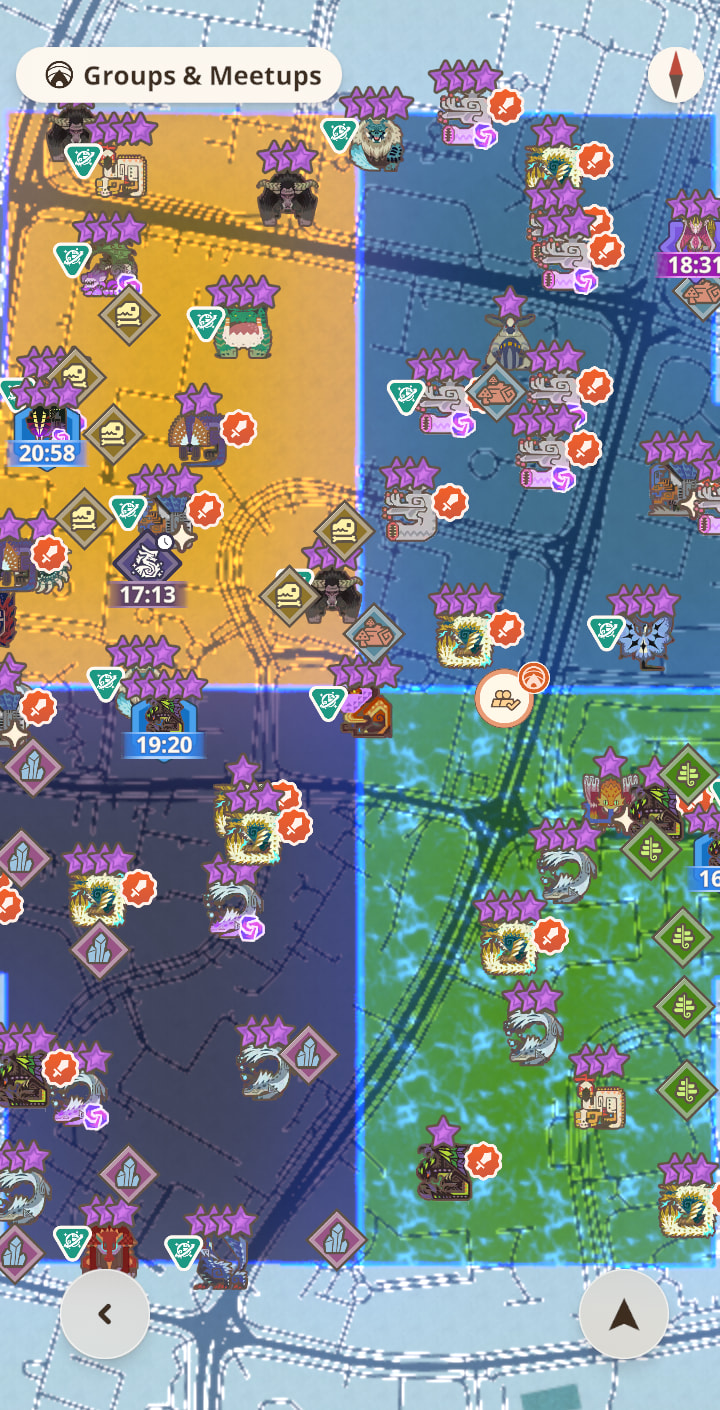
This is the 1544x720, Low settings, but zoomed all the way out. Observe how jagged the lines on the field map become.

The screenshots were taken in PNG format and the phone saved the final resolution of the images at about 80% of the original screen resolution, but the quality of the actual image is preserved, so these screenshots are exactly as what’s shown. However, the forums software stored and compressed the compiled images to jpeg format as the file size of these compiled images are significantly lowered (from 6.46MB, 13.5MB, and 22.4MB to 1.73MB, 3.27MB, and 1.72MB, respectively), so the actual impact of the issue may be dampened artificially due to how this forums stores the images.

2 Likes

I face the same problem on Samsung Galaxy Z Fold 7 running Android 16.

1 Like

画質は中ですね。これはサービス開始当初に設定してから変えてないと思います。2年間ほどこのまま。

ためしに、「高」に設定したら以前と同等程度の表示になりました。通信量などが変わらないのであれば「高」でプレイ続けようと思います。

ただ、ジャギーが目立つ解像度の画質は、通常は「中」とは言わないと思います。

3 Likes

提案/Suggestion

以前より画質中でプレイしていましたが、今回のバージョンアップでマップ上の道のジャギが酷くなりました。
画質高にすることで改善ができますが、バッテリー消耗を考えると変えたくありません。
以前のように画質中でもジャギらないようにしてほしいです。

現状/Current Status

画質中設定でプレイすると、マップ上の道のジャギが酷い

画像、動画ファイル添付(最大30MB)/Attach screen shots, video files(Max30MB)

確かに最近気になってたwwwwww

@here
詳細情報をお知らせくださりありがとうございます。

いただいた情報は調査対象として開発チームへ報告いたしました。皆さまにご案内可能な情報がありましたら、当フォーラムでアナウンスさせていただきます。

Thank you for your report.

The information you have provided has been shared with the development team for further investigation. If there is any additional information we can share on this, we’ll do so on this thread.

今まで画質「低」でプレイしておりましたが今回のアップデートで皆さまが仰られてる通りマップの描画がおかしくなりました。見ていると酔ってしまいまともにプレイ出来ないです。
画質「高」にすれば今まで通りの描画になるのですがバッテリー消耗等のスマホへの負荷が増えてしまうので出来る事ならば前の状態に戻してほしいです。宜しくお願いします。
(或いはマップとそれ以外の画質を個別に設定出来るようにしてほしいです)

2 Likes

これは一旦「高」にして、本当にそうか調べた方がよろしいかと。

流石に時間当たりのバッテリー消費量までは調べてはいませんが狩猟画面では「低」に比べて「高」は明らかに重くなっていますね。
そのことから「低」よりは負荷は明らかに増えているといえると思います。
携帯ゲームで高画質など求めてませんし(「高」の狩猟は酔ってしまう)
ゲームの為にスマホ買い換える気もないですしプレイ対象から外れた思って改善されなければNOWの辞め時かもしれませんね

自分も友人も劣化しててジャギジャギで目が痛かったんですけどこれやっぱ全体的なサイレントナーフでしたか……

とりあえず高にして安寧保ってるんですけど、普通に重たくなるから嫌ですね〜……

以前は低でも道の縁のジャギジャギは目立たなかったけど、今は中でも若干ジャギるね

マップ画面の端末負荷が大きくなっただけっぽくもあるけど…

以前からマップ画面で錬成完了して画面遷移する時とかは一瞬だけジャギってたから、もしかするとグローバルの現在数常時表示がめっちゃキラキラしてるからそのせいとかかも?

一昨日、スマホがぶっ壊れたので、

iPhoneSE(第二世代)→iPhone17(最新機種)

と急激にグレードアップしたのですが、
そしたら「中」でもジャギがほぼ気にならなくなりました。

(再インストールした際に勝手に「高」設定になったのかと思いましたが、「中」のままでした)

同じiPhone17で「中」にしててジャギが気なってる人っていますか?

同じ設定でもスマホの性能によって違うのか、

それとも今まで古いスマホ使ってたので感覚がバグってるのか :sweat_smile:

どっちなのか知りたいです。

@here
本件につきまして、v113で修正させていただきましたので、アプリのアップデートを実施した上でご確認いただけますと幸いです。

問題が継続する場合は改めて本スレッドへお知らせください。
貴重なお時間を割いてご報告くださったこと、感謝いたします。

The issue has been fixed in v113, so please kindly update the app.

If the issue persists, please let us know in this thread.
Thank you for your report.

4 Likes